The MAX-SAFE Reverse Watch system is an advanced reversing aid option for the MAX-SAFE Anti-Rollaway Brake System. The MAX-SAFE Reverse Watch utilises a high quality, programmable system to detect people and objects in blind spots, and, in combination with the MAX-SAFE Brake system, stops the vehicle in the event an object is detected in a pre-defined 'Danger Zone'.
The 'Danger Zone' is calibrated by default to output a trigger if it detects an object within 3m directly behind the vehicle or object heading into the danger zone within approximately 1.3 meters on either side of the centre mounted position of the radar sensor.
If an object is detected in the 'Danger Zone', the radar sends an output signal to the MAX-SAFE ECU, which activates the MAX-SAFE Anti-Rollaway Brake System and applies the vehicle park brake.
The radar monitors a zone of 5-6 metres behind the vehicle with the operation of:
| Operation in Reverse | Warning Symbol | Warning Signal |
| System Active | No Flashing | No signal |
| System in Warning Mode Objected detected within 5 metres | Green - No Flashing | Signal every 1 sec |
| System in Alert Mode Objected detected within 4 metres | Yellow - Flash every 2 sec | Signal every 0.5 sec |
| System in Danger Mode Objected detected within 3 metres | Red - Flash every 1 sec | Solid tone |
When the AI Overlay is installed, the system is active when placed into reverse. If a Vulnerable Road User (VRU) is detected when Reverse Watch is in over-ride, the screen will display DANGER do not reverse Pedestrian Detected and the system will NOT trigger.
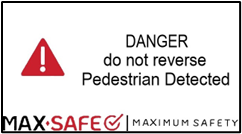
If the Reverse Watch is active and a VRU is detected, the system WILL trigger. To reset the system, change gear to Neutral and APPLY the Park Brake.
If a VRU is still detected after vehicle park brake is released, the system will trigger brake immediately. The timer cannot be over-ridden or restarted, and the system must be reset.
If the system has a false trigger in reverse, there is an opportunity to over-ride the camera to continue reversing but this over-ride can only happen AFTER a trigger from the camera. After trigger, reset the system and double tap the LCD unit to start the 20 second over-ride timer. The driver can then place the vehicle in reverse and release the park brake and reverse until the timer reaches 0. Note that Volvo brakes are released by placing gear lever in Neutral, then into Forward/Reverse gear and lightly pressing the accelerator.
It is advised that after a trigger that a walk around the vehicle takes place to confirm no person is in the danger zone BEFORE over-riding the camera.
The park brake will NOT apply if an objected is detected in the 'Danger Zone' whilst the Pause/Over-ride mode is active.
If the system activates, the brakes can only be released by either pressing the over-ride TWICE or by placing the vehicle in neutral and applying the park brake (specific to single CAN systems. Dual CAN systems, Volvo FM11, and Scania P Series Next Gen differ slightly).
Always ensure it is safe to reverse through the use of mirrors and other reversing aids.
The MAX-SAFE Reverse Watch system is designed to operate optimally at a vehicle speed of 8km/h or lower.
The system WILL NOT BRAKE over 15km/h.
Below is the Operational Functionality Guide for Reverse Watch 2.0.
Was this article helpful?
That’s Great!
Thank you for your feedback
Sorry! We couldn't be helpful
Thank you for your feedback
Feedback sent
We appreciate your effort and will try to fix the article